
Help Mewie settle in.
Use this page for install, the 7-day free trial, activation, transfers, refunds, and privacy-safe support.
Quick start
- Download the Mewie installer from the website.
- Open Mewie and start the 7-day free trial. No card is required.
- If you bought a license, paste the license key from your email.
- Activate this Mac. A paid license allows one active Mac at a time.
- Grant only the local permissions you want Mewie to use.
- Pet Mewie, customize her look, and try one tiny focus win.
License email did not arrive
Check spam, promotions, and the email address used at checkout. If it still does not arrive, email support@mewie.app from the purchase address. Do not send a full license key.
Lost license key later? Email from your purchase address and, after a quick ownership check, we revoke the old key and issue a fresh replacement. Keys are hashed and not stored in plaintext after delivery, so the original cannot be re-sent. A replacement is the recovery path.
Activation failed
If Mewie says the key is invalid, copy the key directly from the email and try again. If Mewie says the license is already active on another Mac, deactivate Mewie on the old Mac first. Old Mac unavailable (sold, wiped, or broken)? Email support and we release the stale device slot after a quick ownership check.
Trial ended
The trial is 7 days per Mac and starts from the app, not the website. After it ends, Mewie stays visible but sleepy. Buy once or enter a license key in Mewie to wake her again.
Community and feature requests
Join r/mewie for feature requests, launch notes, and Mewie setups. For license/payment help, email support@mewie.app.
Moving to another Mac
Open Mewie Settings, choose License, then deactivate this Mac before activating the same key on the new Mac. If the old Mac is unavailable, email support with your purchase email and the last four characters of the key if you have them.
Permissions
Mewie can use cursor position, app focus, typing rhythm, timers, and local agent event kinds. Trial and license checks send entitlement and device metadata only. She does not read typed text, prompts, code, terminal output, screenshots, messages, documents, browser contents, full local paths, full license keys, or receipt signatures.
Integrations
Mewie joins in while you code: she thinks along with your agent, waits when it needs your attention, and celebrates a finished task.
Start with Mewie 1.2.9 or later. Open Settings → Agent and turn Agent Reactions on. Mewie adds the connections for tools she finds on your Mac. Then follow the steps for your tool below.
Connect Codex
Codex needs your approval before Mewie’s hooks can run. Restarting Codex alone does not approve them. A hook is the connection that tells Mewie what your coding agent is doing.
- Open Codex Settings. Search for hooks, then select Hooks.
- Find User config, which applies to all projects. Look for PreToolUse, PermissionRequest, UserPromptSubmit, and Stop.
- Expand the hook in each group. Mewie’s command contains
mewie-agent-hook. If you already use other hooks, identify Mewie’s by that command; the “Hook 1” label alone is not enough. - Review and approve all four Mewie hooks and leave their switches on. An enabled switch alone does not mean a hook has been approved: resolve any untrusted or needs review status.
- Return to a local Codex task and send a message. Keep Mewie running with Agent Reactions on. In Mewie Settings → Agent → Your Tools, Codex changes to Connected after its first event arrives.
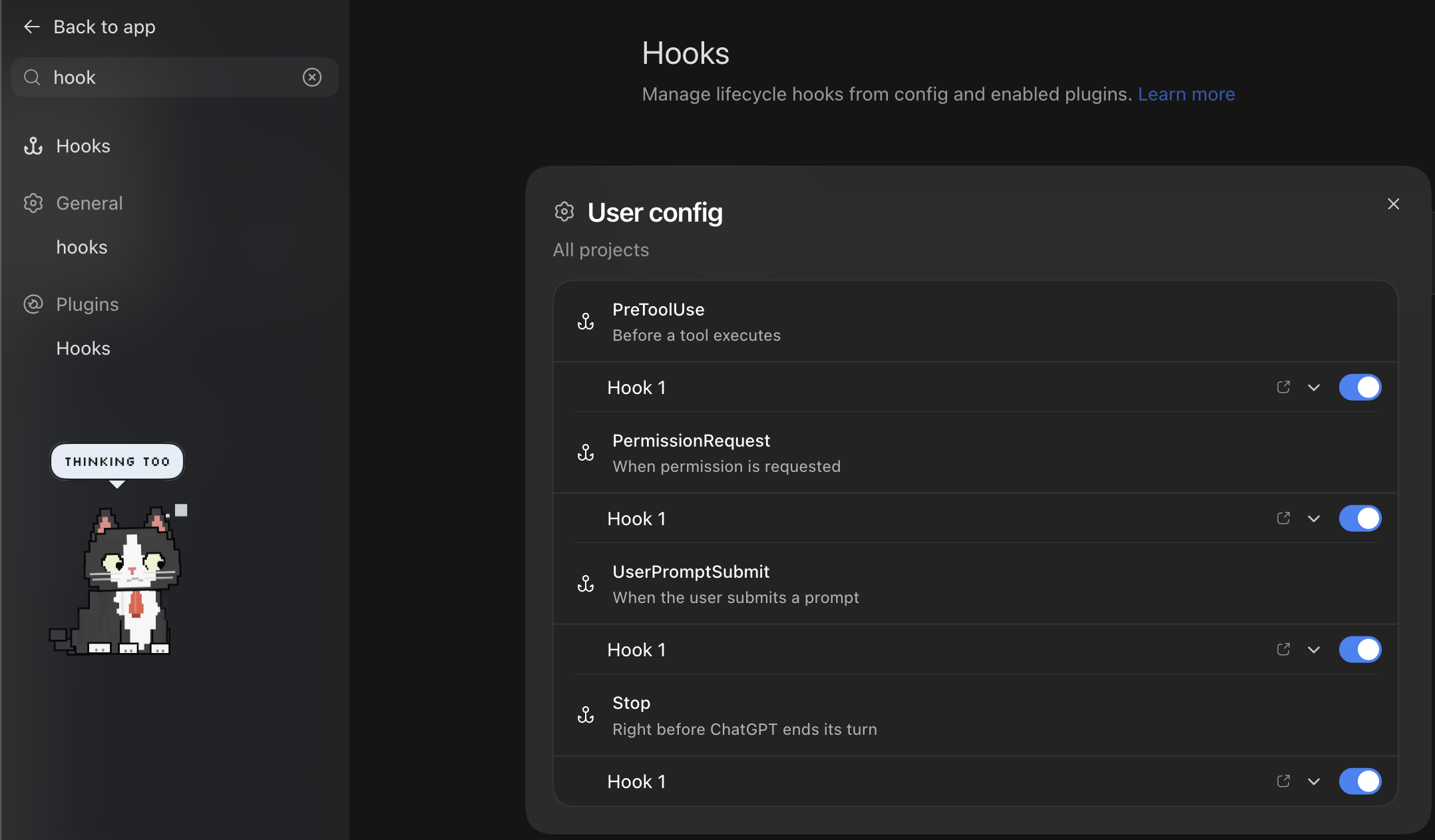
Using Codex in Terminal? Open /hooks to review and approve the same four Mewie hooks. Codex hook approval guide.
Connect Claude Code
- Open Claude Code once so it creates its settings, then open Mewie Settings → Agent and choose Check Again.
- Start a new Claude Code session after Mewie has added the connection. Follow any hook-review prompt Claude Code shows.
- Send a task. Check for Connected beside Claude Code in Mewie’s Your Tools list.
Connect Cursor
- Open Cursor once, then choose Check Again in Mewie Settings → Agent.
- Start a local Agent task in Cursor. Mewie reacts as work starts and finishes.
- Check for Connected beside Cursor in Mewie’s Your Tools list.
How to tell it’s working
- Set up / Ready
- Mewie has added the connection but has not received an event yet. “Set up” is the label in Mewie 1.2.9; it is a status, not a button.
- Connected
- Mewie has received an event from this tool. This confirms the connection has worked; it does not mean a task is currently running.
- Not found
- Open the coding tool once, then choose Check Again in Mewie.
- Needs attention
- Mewie couldn’t update the tool’s configuration. Your existing settings are preserved. Choose Check Again, or contact support if it persists.
- Off
- Agent Reactions is disabled.
Still waiting for Connected? Check that Mewie is running, Agent Reactions is on, and your trial or license is active. In Codex, check that all four Mewie hooks are approved as well as enabled. Send a fresh task after connecting; opening the coding app alone is not a connection test.
These connections work with local sessions on this Mac. Your coding tool’s version or organization settings may restrict hooks. A cloud task or a task running on another computer will not reach your local Mewie.
Turn Agent Reactions off whenever you like. Mewie disconnects her integrations and stops reacting immediately. Turning it back on starts fresh; your coding tool may ask you to review the hooks again if their definitions change.
Support Report
In Mewie, open Settings, then Help, then Support Report. You can email support from there and optionally paste a report after skimming it. The report is designed to include version/build and diagnostic state, not private content.
Refunds
Email within 14 days of purchase if Mewie is not a fit or you bought by mistake. Refunded licenses are deactivated so the device slot can be released cleanly.
Release Notes
Mewie 1.2.11
Tap at your own pace.
- Normal typing keeps Mewie tapping, including late at night and during long work sessions.
- Removed the automatic night guardian schedule. Quiet Hours follows the schedule you enable in Settings.
Mewie 1.2.10
Done means done.
- Agent reactions now follow real events from your coding tool. Pausing typing or moving the mouse no longer starts a false Thinking and Done loop.
- Each completion gets one celebration. Expired activity settles quietly.
- Agent connections say Ready while waiting for their first event, then Connected.
Mewie 1.2.9
Ready for your coding days.
- Mewie sets up reactions for supported local coding tools automatically. Check each connection in Settings, Agent.
- Turning Agent Reactions off disconnects Mewie and clears active reactions. Turn it back on for a fresh start.
Mewie 1.2.8
A calmer Settings window.
- Neutral charcoal surfaces replace the green tint in dark mode.
- Selected sidebar labels and icons use dark ink on the yellow highlight.
Mewie 1.2.7
A clearer first step.
- The installer now displays its new artwork and drag-to-Applications layout correctly.
Mewie 1.2.6
A fresh welcome.
- Meet Mewie in a shorter setup: say hello, try typing together, and choose her look.
- A live preview stays in view while you adjust Appearance.
- Native Mac typography, clearer controls, and a new Mewie icon.
Mewie 1.2.5
Naps on schedule.
- Naps on schedule. Pick a time and a length in Settings, Focus, weekdays only if you like. She asks "step away?" for a few seconds, then curls up. Asked for on Product Hunt.
- A movement setting. Stay put, roam when you're away, or free range. Asked for by a tester on r/mewie.
- She moves herself to Applications. If she runs from the disk image she now offers to move, so ejecting it does not take her with it.
- The trial's last day gets one quiet "Keep her?" bubble, and the expired card has a "tell me why" link. Same cat, same license.
Mewie 1.2.4
She really looks now.
- She can look straight up and straight down. Point your cursor above or below her and her eyes follow all the way. Looking down, she tips her whole head toward the floor like a real cat.
- Opening the app always brings a window. Double-click Mewie in Finder or the Dock and her settings appear, every time.
- Small polish under the fur. Same cat, same license.
Mewie 1.2.3
A reliable launch on macOS 26.
- She opens every time now. On macOS 26, two timing issues could stop Mewie at launch: sometimes she quit before appearing, sometimes she stalled with no menu-bar paw. Both are fixed.
- Faster start. Mewie no longer waits on a slow network name lookup while she wakes up, so she settles onto your desktop a little quicker on every Mac.
- Nothing else changed. Same cat, same look, same license.
Mewie 1.2.2
A calmer Settings window.
- A simpler Settings sidebar. Six plain sections (Appearance, Behavior, Focus, Agent, Privacy, License) with Help and About below. Same controls, fewer words, native macOS chrome.
- Privacy stays one click away. Every permission Mewie can use is explained in its own section, and granting any of them remains optional.
- Moving Macs reads right. A deactivated Mac now points you at reactivating or entering your key, instead of offering a trial you do not need.
- Small polish. Aligned controls, tidier spacing, and window chrome that matches the rest of macOS.
Mewie 1.2.1
Small fixes for the moments around the trial and license.
- Paid licenses recover with a check or the same key, never a second purchase prompt.
- Trial and purchase actions stay out of the way once you have paid.
- First run is calmer, with fewer permission requests and clearer next steps.
- Clicks follow Mewie's visible size more accurately.
Updates are signed and verified before installation. Small previews are also posted in r/mewie.